Fire Room Evaluating Response to VR Immersion in a Simulated Stress Situation This was a group project I worked on with three other classmates in 2016. It was programmed in Unity and uses the Oculus Rift. The point of this project was to study the effects of integrating sight, sound, touch, and olfaction into a virtual scene. A virtual environment was created to test whether incorporating somatic and olfactory senses would produce any significant difference in the sense of presence a user feels in the environment. To test presence, a stressful situation was produced in the VR environment. The virtual room seemingly caught fire. The senses that were simulated were sight (the visual of fire spreading), hearing (the sound of the flames and burning wood), touch (the warmth of the fire), and smell (smoke). This project analyzed how the time of completion for the given tasks suffered as presence and immersion increased. There was a control statistic, where the tasks were completed with no inclusion of the fire simulation or additional sensory stimulation. These sets of times were compared for significance. In addition, we evaluated the sense of presence through the level of stress felt by the user as their environment appeared to catch fire. This was completed through observation notes from the experiment and a brief likert-style questionnaire post-test. The order of the sense included in the immersion was partially randomized for each user. desk setup simulation setup simulation with fire and smoke on screen Above is what the users see before they put the Oculus Rift on, what they see at the beginning of the simulation, and an image showing the room starting to catch on fire. The user was prompted to complete a simple series of observation and reaction-time tests with no prior indication there would be any animation/simulation occurring around them. The tests presented a visual to the users through their Oculus Rift – an ‘L’ or an ‘R’ on a virtual computer screen – and the users had to either click the left mouse button or the right one depending on the letter seen. The user was told that both speed and accuracy were desired and that their completion rates would be recorded. The virtual reality system itself was a full 3D room modeled and textured to match reality as closely as possible. The environment was closed and non-explorable, and the user was sitting for the duration of the experience. The users were prompted to complete a simple series of observation and reaction-time tests with no prior indication there would be any animation/simulation occurring around them. The tests presented a visual to the users through their head-mounted display — an ‘L’ or an ‘R’ on a virtual computer screen — and the users had to either click the left mouse button or the right one depending on the letter seen. The users were told that both speed and accuracy were desired and that their completion rates would be recorded. The virtual reality system itself was a full 3D room modeled and textured to match reality as closely as possible. The environment was closed and non-explorable, and the user was sitting for the duration of the experience. space heater container full of used matches Every 30 seconds the testers would add a new sense to the simulation. The order was randomly predetermined by the testers before the users started the simulation. When the sense of smell was added to the simulation, a container of previously lit matches was opened and placed under the user’s nose (container pictured above). When the sense of sound was added the users were able to hear the fire crackling around them through the headphones they were wearing. The sense of touch was added by turning on a heater (photographed above) that was pointed toward the user from the direction of a virtual flame. To calculate the reaction time, the program is set to have either the letter “L” or “R” appear for 1 second on the screen, and disappear for 1 second. This pattern is repeated until the examiners end the task. The reaction time of the user is calculated each time a letter appears. If the participant hits the correct mouse button, the time is recorded in a text file created by the program. If the participant hits the wrong mouse button or they run out of time, the program will record an “x” or “timeout” respectively. To see how the reaction times of the participants changed based on what senses have been introduced, the program will write a line of text saying the corresponding sense that has been introduced when the examiner clicks on the “1,” “2,” “3,” or “4” button on the keyboard. Fire Room Evaluating Response to VR Immersion in a Simulated Stress Situation Fire Room Evaluating Response to VR Immersion in a Simulated Stress Situation continuedwebsite linkhttps://www.familysupportnet.org/neighborhood-assistance-program-nap-in-new-jersey/ Fire Room Evaluating Response to VR Immersion in a Simulated Stress Situation Fire Room Evaluating Response to VR Immersion in a Simulated Stress Situation Fire Room Fire Room Fire Room Evaluating Response to VR Immersion in a Simulated Stress Situation Evaluating Response to VR Immersion in a Simulated Stress Situation Evaluating Response to VR Immersion in a Simulated Stress Situation This was a group project I worked on with three other classmates in 2016. It was programmed in Unity and uses the Oculus Rift. The point of this project was to study the effects of integrating sight, sound, touch, and olfaction into a virtual scene. A virtual environment was created to test whether incorporating somatic and olfactory senses would produce any significant difference in the sense of presence a user feels in the environment. To test presence, a stressful situation was produced in the VR environment. The virtual room seemingly caught fire. The senses that were simulated were sight (the visual of fire spreading), hearing (the sound of the flames and burning wood), touch (the warmth of the fire), and smell (smoke). This project analyzed how the time
Echo
Echo The Anxiety App Echo is an anxiety app created for staff and students at Algonquin College. The name of the app was inspired by the name of a therapy dog owned by a student at Algonquin College. This project started in the summer of 2014 and took a year to create. Echo was created using PhoneGap by myself and a colleague at Algonquin College. We started by creating a mock-up of the possible path the user would take to navigate between the different pages on the app. Once that was decided we both worked on the code using HTML and CSS that would be exported for Apple and Android devices through PhoneGap. I created the graphics in the app and went through the process of submitting the app to iTunes. We talked with the client a lot about what type of activities would be in the app and what the layout of the app would be. Once this was decided, we worked on creating each individual page and making sure it was what the client wanted.
Online Nursing Requisition
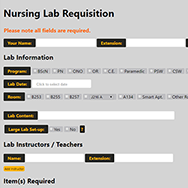
Online Nursing Requisition For Nursing Faculty at Algonquin College This project was created for the Nursing Department faculty at Algonquin College. The goal of this project was to create a digital and more cohesive way for the faculty to book out rooms and equipment. The client wanted a website that would make it easier for the Nursing Lab Technologist to order equipment and be able to deliver the proper equipment to the labs on the right day. The requisition allows nursing faculty to fill out what they need for a specific day, the quantity of each item, as well as it allows them to save a PDF version to their computer. They can upload these PDFs to the website to make edits to the requisition instead of starting over each time they need to book a lab. When they submit the form they get an email confirmation and the Nursing Lab Technologist gets emailed a link to a PDF of the requisition. My team and I met with the Nursing Lab Technologist and the Coordinator of the Nursing Department to better understand what the end goal was for this project. We met many times in the process of creating this project to make sure it was what the client envisioned. We also did user testing with the other faculty to make sure it was easy for them to use. We made many tweaks to make sure the requisition made sense to all that was using it. This was a project started in the summer of 2014. The project took a year to finish. I created the general design of the website using HTML and CSS, as well as worked on the database using PHP, MySQL, and Workbench.
End of Days Escape Room
End of Days Escape Room Senior Project https://www.youtube.com/watch?v=50jNY9clSdk&t=1s&ab_channel=1artistintraining End of Days Escape Room was my final year project (A.K.A Senior Project) when I was studying Interactive Multimedia and Design (IMD) at Carleton University. The point of this project is to break into groups of four to six members and apply the knowledge we have learned while studying IMD. We are given a full year to create these projects from March of our third year until the beginning of April of our fourth year. At the end of our fourth year of study, we are expected to display our projects to a panel of industry judges and the general public at an event called the Senior Project Fair. For this project, I was in a group with five other team members. We called our team. Other People. We wanted to create a unique experience that had not been displayed before at the Senior Project Fair; so we chose to create a real-life escape room. Start Step 1 Research and Theme Decision The first thing we had to do for this project was research. At this point in the project, only one of my team members had been to an escape room in the past. We went to many escape rooms to get an idea of what types of puzzles were present, and how hard they were compared to the total time. Once we felt we had a better understanding of the different puzzle progressions, we started to plan the theme and the story of our escape room. Deciding the theme was a very important step for us. We needed to decide this right away because it would help us decide what type of puzzles would make sense in that space to keep the immersive feeling we wanted. The idea we landed on was post-apocalyptic. The world has evolved to kill humans. For years humanity has been surviving in bunkers and underground safe houses, away from a world that has decided we are the virus. Plants poison the air outside and beasts prey on unfortunate people stuck outside unprotected. There were threats during the day and at night but sunrise or sunset was the safest time to go outside. This was the time when nature was just starting to go to sleep or just waking up. Step 2 Puzzle Progression Once the theme was decided; one of my teammates and I worked together to create a puzzle progression that would be both difficult and enjoyable. We were only going to let teams in the room for 15 minutes so we did not want the puzzles to be too difficult but at the same time we did not want it to be too simple either. The image above is the final puzzle progression we went with. Step 3 Room Layout The next stage of our project was to plan the layout of our room. The image to the left is the layout of our room. The room was divided into quarters with a built-in room divider in the middle of the room going in one direction. The top left area was the escape room. This is where the players tried to complete the puzzles in order to successfully escape the room. The bottom left is where we kept a lot of our behind-the-scenes tech. We wanted to hide this so the escape room area did not lose the immersive feeling we were trying to convey. The top right is the waiting area. This is where the next team to go into the escape room waited and received the introduction and rules to the room. The bottom right was where we would have a screen to watch as people tried to solve the puzzles in the room. We did this so everyone could experience the room to some degree as we could only allow so many groups to participate during the Senior Project Fair. This is also where people could ask us questions about our project. Step 4 Puzzle Design Once this was finalized we started designing our puzzles. We had an electrical panel that needed wires to be connected in a certain way, an animatronic plant that moves up and down based on light, and an override panel. Originally we had a beetle puzzle but we scrapped it because we it was causing us problems to build so we replaced it with a tree stump with a motion sensor that would brush your arm as you got close to grabbing the necessary piece found in it. On top of these technical puzzles we had to build, we also had a combination lock and a key lock. I was responsible for programming the flower. I used an Arduino Uno, a servo, and two photoresistors. One of my team members build the structure of the animatronic and another team member created the design concepts. The purpose of the puzzle was to have the flower in the way of puzzle piece for another puzzle in the progression. The flower was mostly hidden behind the fence but there was a hole forming where the flower was “growing.” With the light sensors in the middle of the flower head, the flower would move up or down towards the light. The players had to use a flashlight to lift the flower head up to expose the puzzle piece they needed. Step 5 Room Design Once we had all the elements we wanted to make the room work, it was time to make the room immersive as possible. We got barbwire fencing to keep players away from the projector screen but added difficulty to finding puzzle pieces. I was responsible for coding the lighting in the room to correspond with a sunset projection one of my team members created. To make the lights change color I used an Arduino Uno and a 5-meter RGB light strip. It took a while to figure out the coding for the lights did use half of the full RGB colour range. Once I was figured that