Evaluating Response to VR Immersion in a Simulated Stress Situation
This was a group project I worked on with three other classmates in 2016. It was programmed in Unity and uses the Oculus Rift.
The point of this project was to study the effects of integrating sight, sound, touch, and olfaction into a virtual scene. A virtual environment was created to test whether incorporating somatic and olfactory senses would produce any significant difference in the sense of presence a user feels in the environment.
To test presence, a stressful situation was produced in the VR environment. The virtual room seemingly caught fire. The senses that were simulated were sight (the visual of fire spreading), hearing (the sound of the flames and burning wood), touch (the warmth of the fire), and smell (smoke).
This project analyzed how the time of completion for the given tasks suffered as presence and immersion increased. There was a control statistic, where the tasks were completed with no inclusion of the fire simulation or additional sensory stimulation. These sets of times were compared for significance. In addition, we evaluated the sense of presence through the level of stress felt by the user as their environment appeared to catch fire. This was completed through observation notes from the experiment and a brief likert-style questionnaire post-test.
The order of the sense included in the immersion was partially randomized for each user.
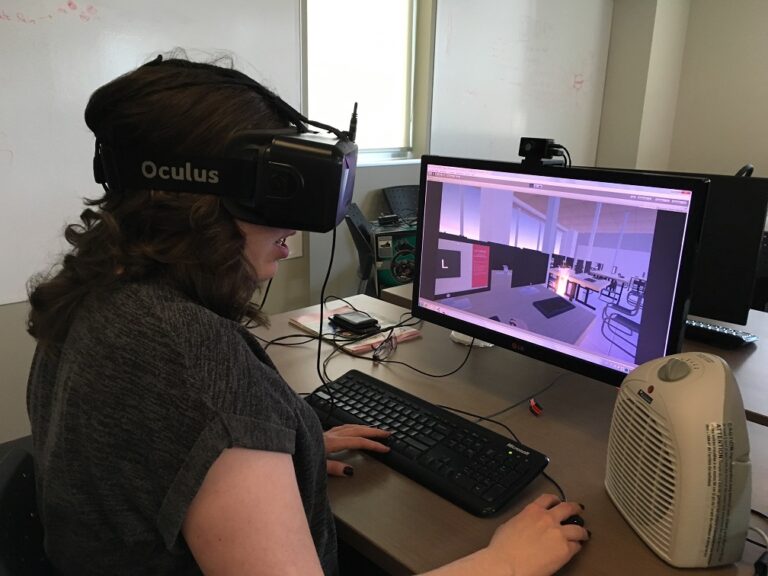
desk setup
simulation setup
simulation with fire and smoke on screen
Above is what the users see before they put the Oculus Rift on, what they see at the beginning of the simulation, and an image showing the room starting to catch on fire.
The user was prompted to complete a simple series of observation and reaction-time tests with no prior indication there would be any animation/simulation occurring around them. The tests presented a visual to the users through their Oculus Rift – an ‘L’ or an ‘R’ on a virtual computer screen – and the users had to either click the left mouse button or the right one depending on the letter seen. The user was told that both speed and accuracy were desired and that their completion rates would be recorded. The virtual reality system itself was a full 3D room modeled and textured to match reality as closely as possible. The environment was closed and non-explorable, and the user was sitting for the duration of the experience.
The users were prompted to complete a simple series of observation and reaction-time tests with no prior indication there would be any animation/simulation occurring around them. The tests presented a visual to the users through their head-mounted display — an ‘L’ or an ‘R’ on a virtual computer screen — and the users had to either click the left mouse button or the right one depending on the letter seen. The users were told that both speed and accuracy were desired and that their completion rates would be recorded. The virtual reality system itself was a full 3D room modeled and textured to match reality as closely as possible. The environment was closed and non-explorable, and the user was sitting for the duration of the experience.
space heater
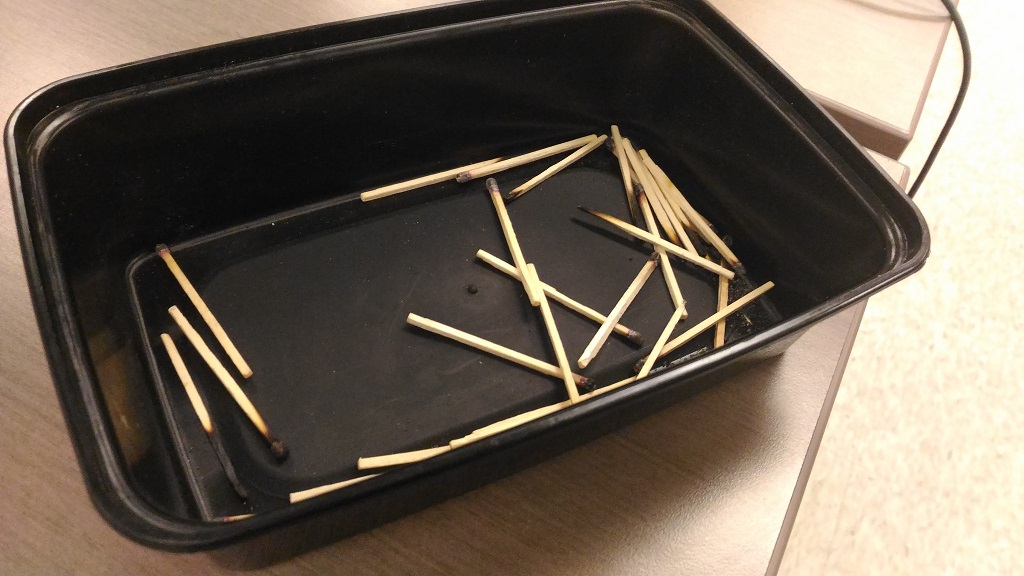
container full of used matches
Every 30 seconds the testers would add a new sense to the simulation. The order was randomly predetermined by the testers before the users started the simulation. When the sense of smell was added to the simulation, a container of previously lit matches was opened and placed under the user’s nose (container pictured above). When the sense of sound was added the users were able to hear the fire crackling around them through the headphones they were wearing. The sense of touch was added by turning on a heater (photographed above) that was pointed toward the user from the direction of a virtual flame.
To calculate the reaction time, the program is set to have either the letter “L” or “R” appear for 1 second on the screen, and disappear for 1 second. This pattern is repeated until the examiners end the task. The reaction time of the user is calculated each time a letter appears. If the participant hits the correct mouse button, the time is recorded in a text file created by the program. If the participant hits the wrong mouse button or they run out of time, the program will record an “x” or “timeout” respectively. To see how the reaction times of the participants changed based on what senses have been introduced, the program will write a line of text saying the corresponding sense that has been introduced when the examiner clicks on the “1,” “2,” “3,” or “4” button on the keyboard.