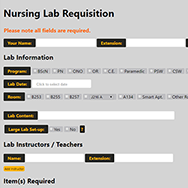
Online Nursing Requisition For Nursing Faculty at Algonquin College This project was created for the Nursing Department faculty at Algonquin College. The goal of this project was to create a digital and more cohesive way for the faculty to book out rooms and equipment. The client wanted a website that would make it easier for the Nursing Lab Technologist to order equipment and be able to deliver the proper equipment to the labs on the right day. The requisition allows nursing faculty to fill out what they need for a specific day, the quantity of each item, as well as it allows them to save a PDF version to their computer. They can upload these PDFs to the website to make edits to the requisition instead of starting over each time they need to book a lab. When they submit the form they get an email confirmation and the Nursing Lab Technologist gets emailed a link to a PDF of the requisition. My team and I met with the Nursing Lab Technologist and the Coordinator of the Nursing Department to better understand what the end goal was for this project. We met many times in the process of creating this project to make sure it was what the client envisioned. We also did user testing with the other faculty to make sure it was easy for them to use. We made many tweaks to make sure the requisition made sense to all that was using it. This was a project started in the summer of 2014. The project took a year to finish. I created the general design of the website using HTML and CSS, as well as worked on the database using PHP, MySQL, and Workbench.
Advancing Learning
Advancing Learning Conference 2015 Advancing Learning is an instructional technology conference that is hosted by a college in Ontario each year. In 2015, Algonquin College was chosen to be the host of the conference. I was a member of the marketing and communication teams for this conference. Being part of these teams meant I was responsible for creating printed material for the conference (badges, posters, etc.), building the website, and helping with social media aspects of the conference. I worked on the website by using WordPress, HTML, and CSS to edit the pages. I also used PHP to create a custom WordPress widget. The badges were created using Adobe Illustrator CC. They went through many variations before the final design was decided. The following are some of the different stages the badges went through. The committee wanted to find a way to add stickers to the badges to encourage engagement between participants. Our solution was to add blank circles on their name badges that were the same size as the stickers to show where they could be placed. Previous Next The final badges had four different looks – participant, sponsor, volunteer, and speaker. The circles for the stickers were taken off because the committee thought it would be best to allow the participants to place the stickers anywhere on their badges. The final design piece I created was a poster of the agenda for the conference. They were printed out and placed throughout the campus for quick view. Speaker Badge Sponsor Badge Volunteer Badge Participant Badge